Project Retrospectives
Why long-form TTS needs a queue, not repeated paste-and-generate
How VoxInfinity turns Inworld AI's homepage TTS widget into a browser-session queue for books, articles, long notes, direct requests, and playback.
VoxInfinity started as a practical question: Inworld AI has a strong free text-to-speech widget, but what if I want to hear a whole book chapter, long article, research note, or draft without manually pasting and generating every small section?
The result is a free long-form TTS experiment: paste long text once, split it into safe chunks, generate voice clips through the active Inworld AI page session, and listen through a custom queue.
The project lives on GitHub as VoxInfinity. It includes two userscripts: a Direct API mode that sends speech requests through the active page session, and a DOM Automation fallback that uses the page UI.
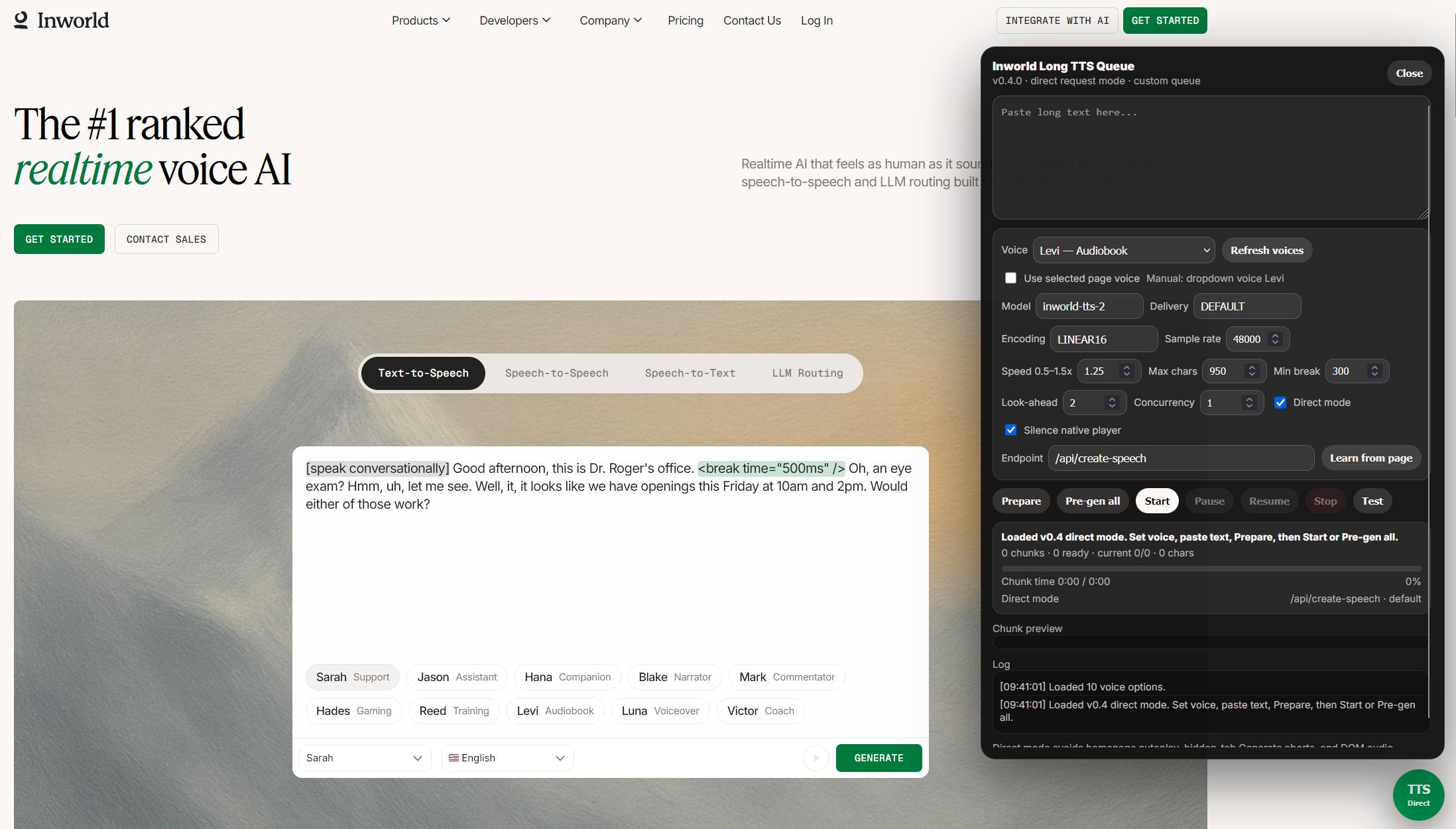
Free Inworld AI TTS for books and long text
Inworld AI’s homepage TTS widget is useful for short prompts. That is a reasonable product boundary for a web widget, but it becomes friction if the input is a book chapter, article, transcript, essay draft, or long technical note.
The obvious manual flow is repetitive:
- paste a chunk of text
- choose a voice and model
- click generate
- wait for audio
- play it
- repeat until the document is finished
VoxInfinity works around that workflow by splitting long text into smaller chunks, generating audio for each chunk, and playing the generated clips through its own queue.
For search, the simple description is: VoxInfinity is my free Inworld AI long-form TTS userscript for listening to books, articles, notes, and other long text as generated voice audio. In the tested homepage-widget flow, I treated it as an unlimited free voice generator for my own long-text experiments while keeping the paid playground limits separate.
The careful description matters too. This does not make every Inworld AI path unlimited. The playground still follows the platform’s normal account, quota, and free-credit limits. The homepage widget was the free/unlimited experiment target I tested most. The point of the project was not to pretend paid limits disappear. The point was to see how far a browser-session queue could go when the page already allows the session to generate speech.
The useful boundary is:
long text -> sentence-aware chunks -> generated clips -> playback queue -> retryable failuresThe queue is what turns a short-form widget into a long-form listening workflow.
Why Direct API mode became the main path
The first design direction was DOM automation. That is the most straightforward way to think about a userscript: find the textarea, set the value, click the page’s Generate button, observe the returned audio, then repeat.
That approach works, but it inherits every browser and page timing problem:
- hidden tabs can throttle automation
- generated audio can auto-play before the custom queue is ready
- button state can change while the script is waiting
- selectors can drift when the page UI changes
- waiting for DOM audio is slower than sending the known request directly
Direct API mode became the better experiment. Instead of clicking through the Inworld AI UI for every chunk, the script uses the page session to send speech requests directly to the learned/default speech endpoint. It still expects the target tab to exist and remain active during generation, but it removes a lot of the fragile “pretend to be a user clicking fast” behavior.
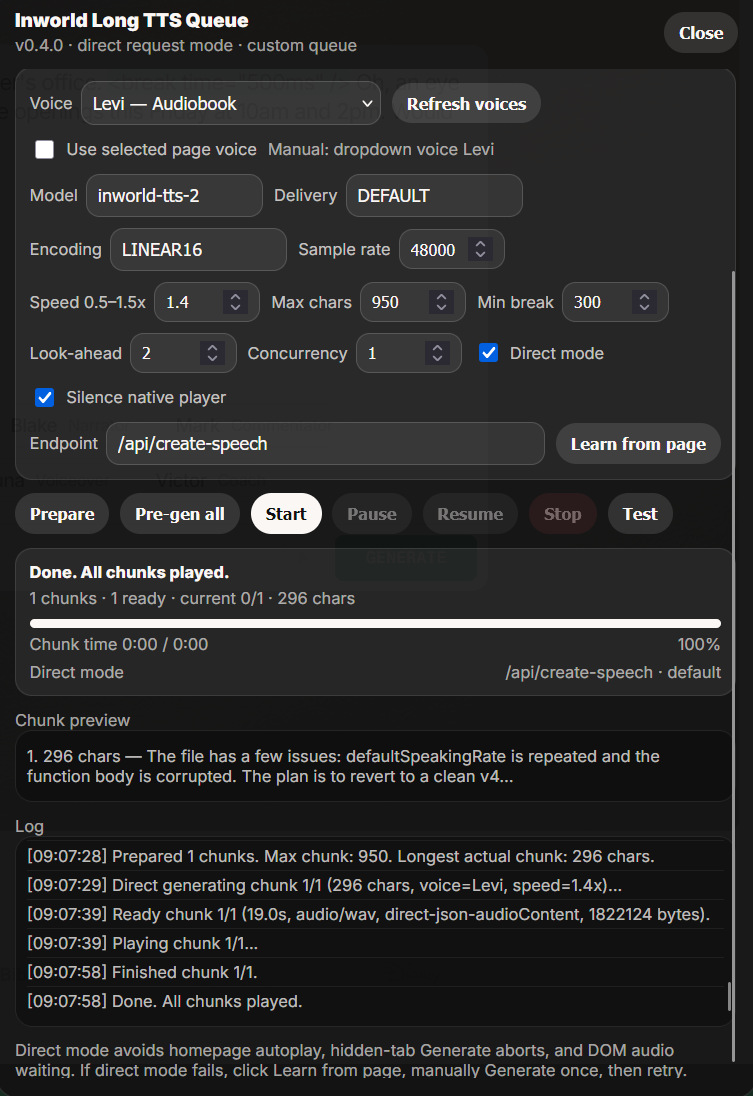
The queue is the actual product
The most useful part of VoxInfinity is not the button injection. It is the queue model.
The script prepares chunks with a safe maximum size, keeps sentence and paragraph breaks when possible, generates clips ahead of playback, and tracks which clips are ready. For long text, the important control is Pre-gen all: generate the queue while the tab is active, then play from the prepared clips.
That changed the workflow from “babysit the widget” to “prepare the audio queue.” I can paste a long note, a draft, or a public-domain book chapter and let VoxInfinity turn it into a sequence of generated voice clips. It also made failure easier to reason about. A chunk can be pending, generating, ready, playing, failed, or already played. That is a much better state model than a single page button that may or may not currently be enabled.
The tradeoff
This is not a polished SaaS product. It depends on a browser session, a visible target tab, page behavior that can change, and a userscript environment that is intentionally local and experimental.
That tradeoff is acceptable for the goal. VoxInfinity is a research tool for my own long-form TTS workflow. Making those boundaries explicit is better than pretending a userscript has the same reliability contract as a hosted audio service.
Why the repo hid the target but this post names it
One detail matters for how I published it: the blog can say Inworld AI because discoverability matters here, but the checked-in userscripts still avoid obvious target literals.
The repo keeps TARGET_DOMAIN and TARGET_MODEL placeholders in the scripts, and configure.py patches those values locally before installation. The configurator stores the target strings in an encoded form to keep the generated userscripts out of simple code-search hits.
That is not security. It is a small publishing boundary. Obvious public literals can be searched for, patched against, or used as a direct target map. The screenshot still shows the experiment context, but the installed scripts are generated locally instead of being checked in with easy match rules.
This is also why the README frames the project as an experiment rather than a general-purpose package.
What I learned
This project reminded me that browser automation is rarely just “click this button many times.” The useful work was drawing boundaries around the unreliable parts:
- chunking text before it hits the platform limit
- preferring direct request mode over repeated UI automation
- keeping DOM automation as a fallback, not the main path
- preserving a visible-tab generation rule
- separating generation from playback with pre-generation
- publishing with enough context to explain the experiment without making the repo a plain target list
VoxInfinity is still intentionally rough. It is a research tool for my own long-form TTS and free voice generation experiments, not a product promise. The clean lesson is narrower: when a web UI is built around short interactions, a small queue layer can turn it into a more usable long-form listening workflow if the session, limits, and failure states are made explicit.